From Netlist to Diagram in Seconds
Import your wiring netlists directly from CSV or Excel.
Generate an interactive drawing instantly.
Say goodbye! to hours of clicking, manual routing, and tedious tweaking.
All data is private and local.
(No Re-download Required)
Real software demo shown
Accelerate every stage of the lifecycle—from design review, to build, to manufacturing exports—using our searchable, fully interactive environment where you can click any connector, trace any net, and instantly illuminate signal paths via the integrated Data Panel.
Why Design with Termino?
Engineered to remove the weight and manual tediousness of legacy CAD software & tools.
Stop messing around making "collage Powerpoint art" in Visio, Lucidchart, Draw.io, etc.
Stop wasting time on library management.
Start building better, faster, and more reliably.
Focus on the engineering and design that matters!
Automated Interactive Diagrams
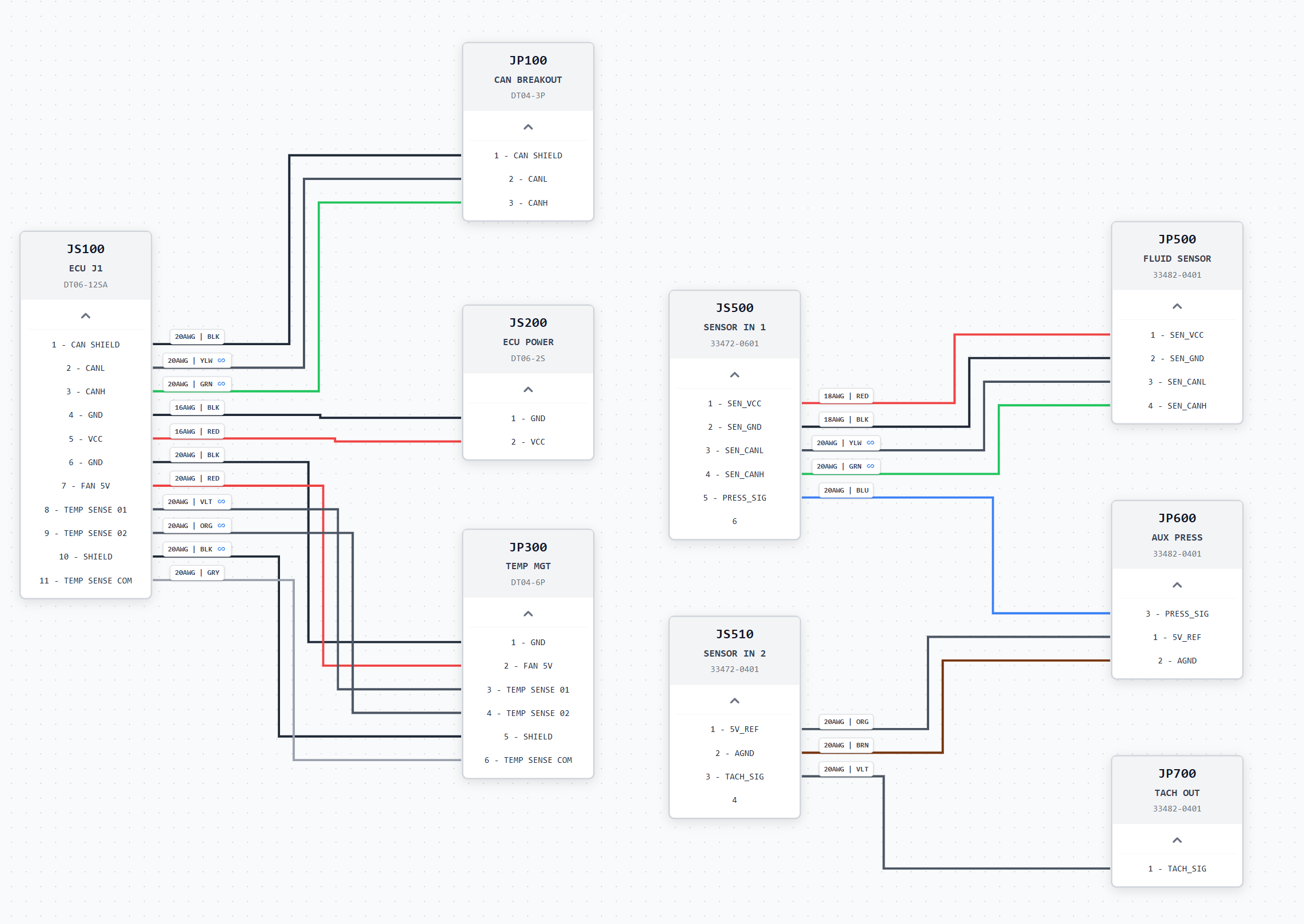
- ▪Eliminate Drawing Fatigue: Say goodbye to manual click-and-drag grid alignment, overlapping line routing, or coordinate adjustments.
- ▪Smart Auto-Layout: Manhattan routing engine automatically recalculates clean 90-degree vector paths in real-time.
- ▪Dynamic Iteration: Move connector blocks freely and watch all connected wire pathways recalculate instantly.
- ▪Intelligent Search & Filtering: Dynamically highlight and filter individual wires & signals by net name, gauge, connector, or circuit group.
Rapid Development & Iteration
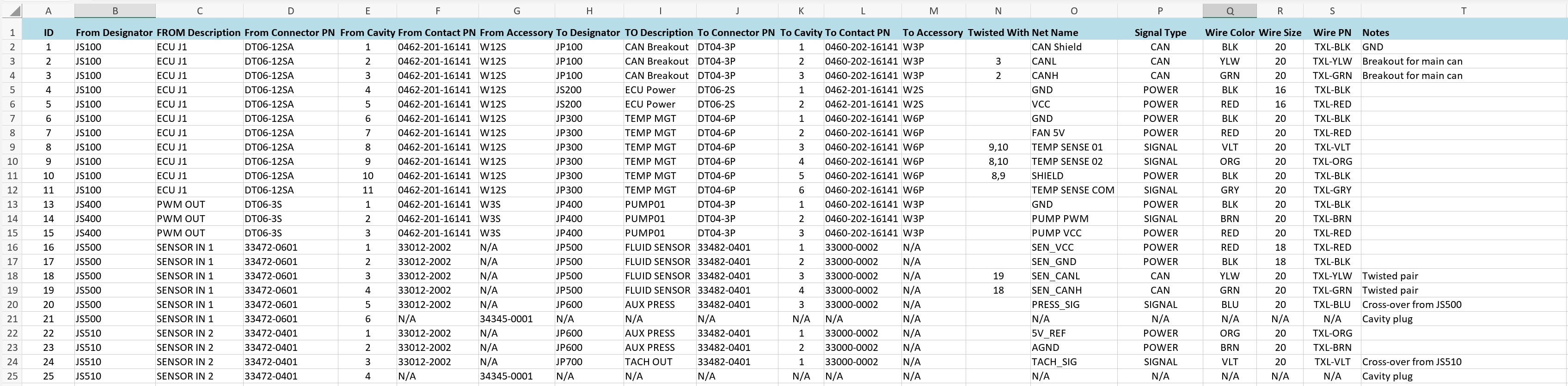
- ▪Spreadsheet-Native: Work directly with familiar spreadsheets (CSV, Excel) rather than high-friction setups.
- ▪Friction-Free Updates: Modify connection data, wire attributes, and add custom columns as desired. No clunky restraints.
- ▪Zero Infrastructure Bloat: No heavy database installations, complex components configuration, or expensive library management required.
Build-Ready Drawings
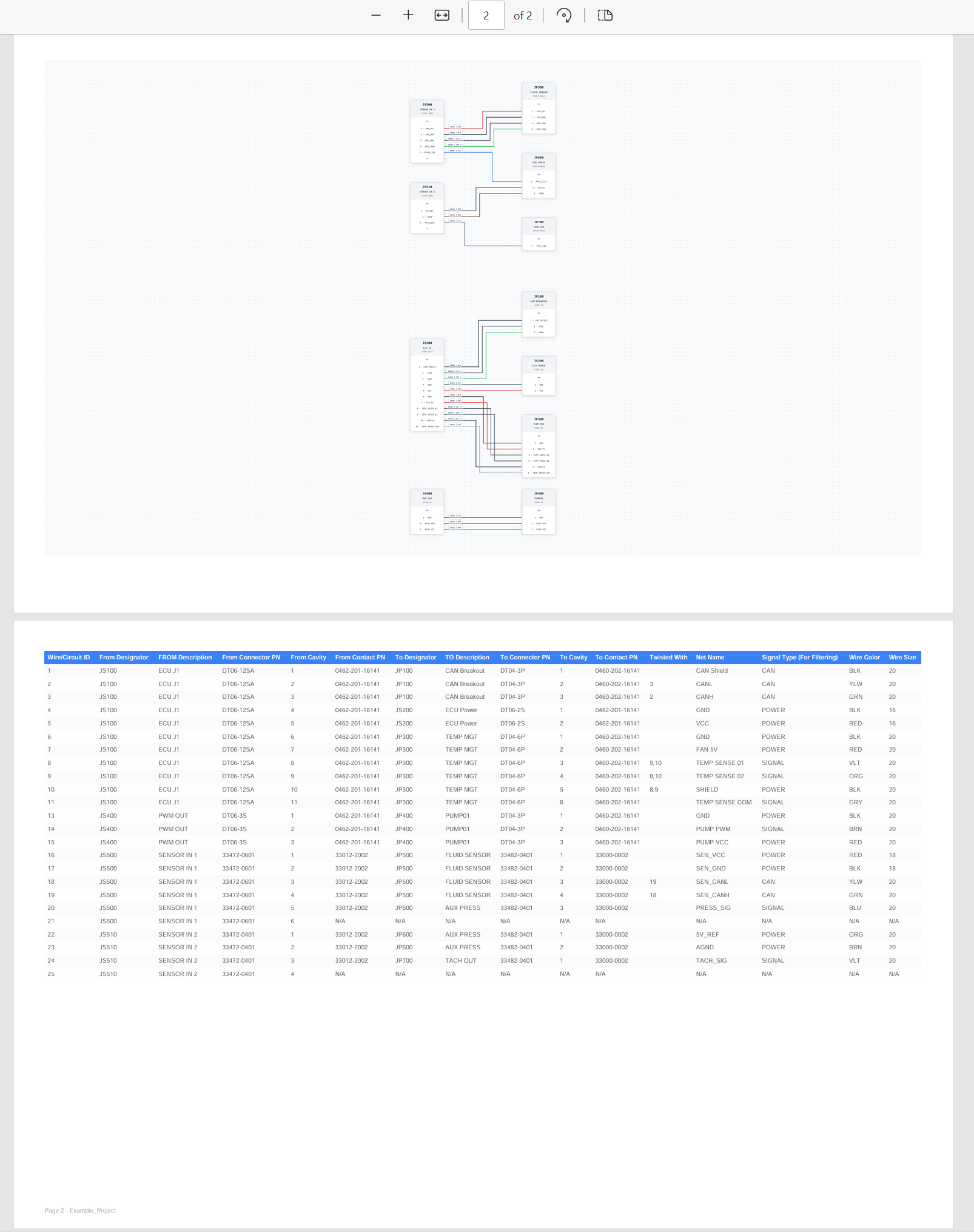
- ▪Vector-Perfect Exports: Export high-resolution PDFs with relevant diagram and data rows, ready to hit the build floor and expedite assembly.
- ▪Interactive Data Panel View: Live Data Panel allows workbench technicians to trace nets and highlight circuits in real-time.
- ▪Instant Manufacturing Data Exports: Automated Bill of Materials (BOM) list generation and error checking
AI-Ready Data Pipelines
- ▪No Vendor Lock-In: Engineering data stays in open .csv and .xlsx formats with zero proprietary database layers.
- ▪Leverage LLM Automation: Pass raw wirelist text to ChatGPT or Claude to auto-generate connector schedules and parse pins.
- ▪Seamless Custom Scripting: Run Python automation to manipulate gauges, strip flags, or net names across thousands of rows.
Technical Features
Data-Driven Schematics
Map your custom CSV/Excel harness & wirelist spreadsheets directly into visual nodes and connections.
Advanced Filtering
Instantly illuminate specific signal types, gauges, and wire colors with our intuitive sidebar controls
Vector-Perfect Exports
Export high-resolution standalone PDFs and interactive HTMLs of your harness design for documentation and sharing.
Intelligent Auto-Layout
Our routing algorithms auto-place connectors and clean up edge paths, delivering a clean, manufacturing-ready schematic without the manual labor.
Automatic Single-Line Mode
Instantly collapse complex wire bundles into clean single-line diagrams to reduce schematic clutter and improve readability.
BOM Generation
Use our advanced toolset to auto-generate a Bill of Materials (BOM)